前言
本文将会介绍下 如何使用指令的方式使用proxmox快速创建一个debian 13虚拟机。
创建内网vmbr
进入 PVE Web 管理界面:
节点 → 系统 → 网络 → Create → Linux Bridge
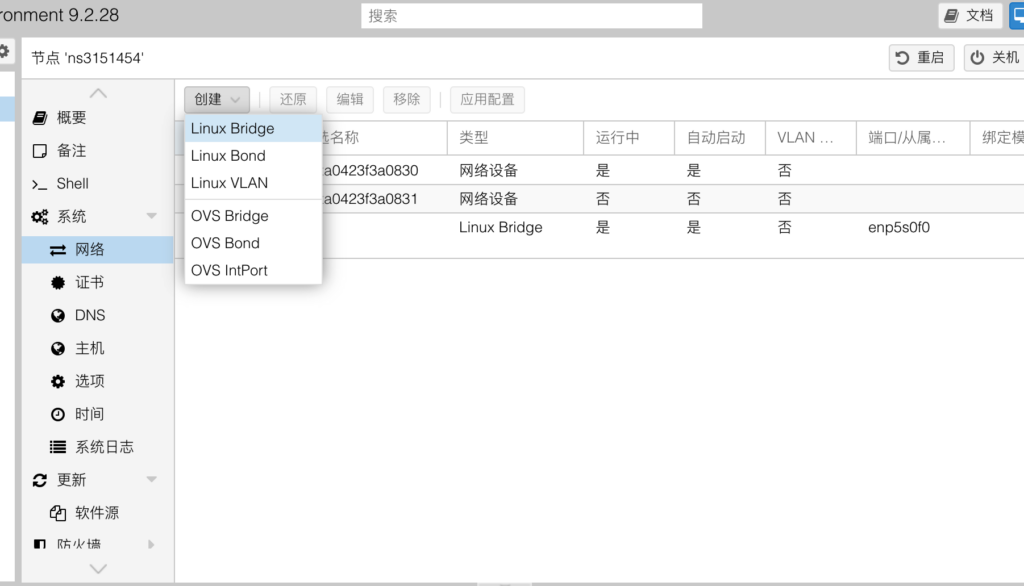
填写如下参数:
| 配置 | 值 |
|---|---|
| 名称 | vmbr1 |
| IPv4/CIDR | 10.10.10.1/24 |
| IPv6/CIDR(如果有IPV6需要) | fd3a:f79c:4d3d:1::1/64 |
| 网关 | 留空 |
| 网桥端口 | 留空 |
| 自动启动 | 勾选 |
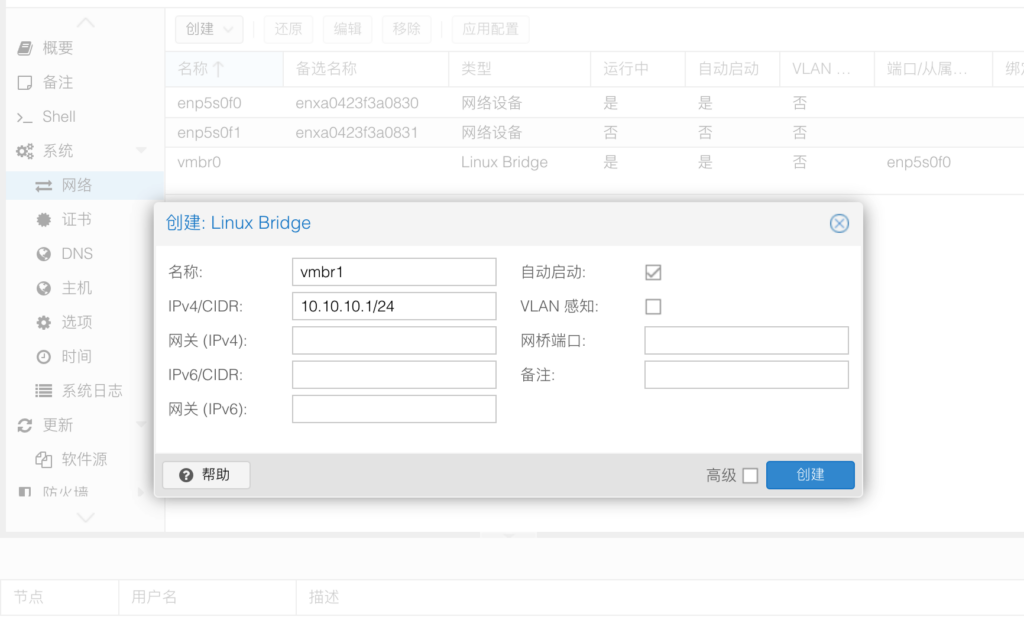
点击创建后,再点击下应用配置
配置NAT
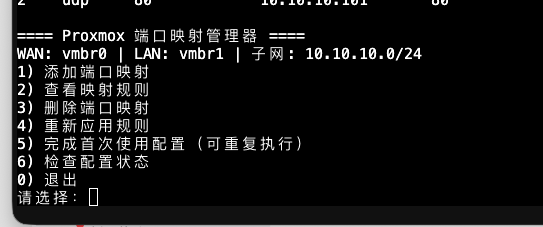
直接使用下面的脚本就OK了。另存我写的这个脚本到服务器上并执行,先执行一次 完成首次使用配置,然后添加相关NAT端口映射规则即可。在创建虚拟机之前,建议先使用本脚本 执行一次 完成首次使用配置
#!/usr/bin/env bash
# Proxmox port mapping manager V3.2: IPv4 NAT44 + optional IPv6 NAT66.
# Run on a PVE host using vmbr0 (WAN), vmbr1 (LAN) and IPv4 10.10.10.1/24.
# IPv6 is OPT-IN. vmbr1 ULA /64 must be configured by PVE, never by this script.
# Existing V2 IPv4 saved rules are kept at /etc/pve-portmap-manager/rules.tsv.
set -Eeuo pipefail

WAN=vmbr0
LAN=vmbr1
V4_SUBNET=10.10.10.0/24
V4_GW=10.10.10.1/24
DIR=/etc/pve-portmap-manager
RULES4="$DIR/rules.tsv"
RULES6="$DIR/rules6.tsv"
V6_CONF="$DIR/ipv6.conf"
SELF=/usr/local/sbin/pve-portmap
UNIT=pve-portmap-manager.service
UNIT_FILE="/etc/systemd/system/$UNIT"
SYSCTL_FILE=/etc/sysctl.d/99-pve-portmap-manager.conf
NAT4=PVEPM_NAT
FWD4=PVEPM_FWD
NAT6=PVEPM6_NAT
FWD6=PVEPM6_FWD
V6_SUBNET=''
V6_GW_ADDR=''
V6_GW_CIDR=''
V6_SAMPLE=''

(( EUID == 0 )) || { echo '错误:必须以 root 在 PVE 宿主机执行。' >&2; exit 1; }
fail() { printf '错误:%s\n' "$*" >&2; exit 1; }
ip4() { iptables -w 5 "$@"; }
ip6() { ip6tables -w 5 "$@"; }

check_tools() {
    local t
    for t in iptables ip sysctl systemctl awk install python3 cmp ss; do
        command -v "$t" >/dev/null 2>&1 || fail "未找到命令 $t"
    done
}
init_store() {
    install -d -m 700 "$DIR"
    if [[ ! -f "$RULES4" ]]; then
        printf '# protocol public_port vm_ip vm_port\n' > "$RULES4"
        chmod 600 "$RULES4"
    fi
    if [[ ! -f "$RULES6" ]]; then
        printf '# protocol public_port vm_ip vm_port\n' > "$RULES6"
        chmod 600 "$RULES6"
    fi
}
valid_port() {
    local p="$1"
    [[ "$p" =~ ^[0-9]{1,5}$ ]] || return 1
    (( 10#$p >= 1 && 10#$p <= 65535 ))
}
valid_ip4() {
    local a="$1" oct
    [[ "$a" =~ ^10\.10\.10\.([0-9]{1,3})$ ]] || return 1
    oct="${BASH_REMATCH[1]}"
    [[ "$oct" == 0 || "$oct" != 0* ]] || return 1
    (( 10#$oct >= 2 && 10#$oct <= 254 ))
}
valid_ip6() {
    python3 - "$1" "$V6_SUBNET" "$V6_GW_ADDR" <<'PY'
import ipaddress, sys
try:
    a = ipaddress.IPv6Address(sys.argv[1])
    n = ipaddress.IPv6Network(sys.argv[2])
    g = ipaddress.IPv6Address(sys.argv[3])
    assert a in n and a != g and not a.is_multicast and a != n.network_address
except (AssertionError, ValueError, IndexError):
    raise SystemExit(1)
PY
}

check_ipv4_network() {
    ip link show dev "$WAN" >/dev/null 2>&1 || fail "公网网桥 $WAN 不存在"
    ip link show dev "$LAN" >/dev/null 2>&1 || fail "内网网桥 $LAN 不存在"
    ip -o -4 addr show dev "$LAN" | awk -v addr="$V4_GW" '$4 == addr {ok=1} END {exit !ok}' || \
        fail "$LAN 未配置 $V4_GW。请先创建私有网桥。"
    local outif
    outif=$(ip -4 route get 1.1.1.1 | awk '{for(i=1;i<=NF;i++)if($i=="dev"){print $(i+1);exit}}')
    [[ "$outif" == "$WAN" ]] || fail "当前 IPv4 出口为 ${outif:-未知},与脚本的 $WAN 不一致"
}

# Check IPv6 upstream BEFORE enabling forwarding. Avoid changing WAN routes.
check_ipv6_upstream() {
    command -v ip6tables >/dev/null 2>&1 || fail "缺少命令 ip6tables(IPv6 NAT66 需要)"
    ip6 -t nat -L POSTROUTING >/dev/null 2>&1 || fail '当前系统不支持 ip6tables nat(NAT66)'
    local line iface src
    line=$(ip -6 route get 2606:4700:4700::1111 2>/dev/null) || fail '宿主机没有可用的 IPv6 默认路由'
    iface=$(awk '{for(i=1;i<=NF;i++)if($i=="dev"){print $(i+1);exit}}' <<< "$line")
    [[ "$iface" == "$WAN" ]] || fail "当前 IPv6 出口为 ${iface:-未知},不是 $WAN"
    src=$(awk '{for(i=1;i<=NF;i++)if($i=="src"){print $(i+1);exit}}' <<< "$line")
    python3 - "$src" <<'PY' || fail '宿主机没有可用于 NAT66 的全局公网 IPv6 地址'
import ipaddress, sys
try:
    assert ipaddress.IPv6Address(sys.argv[1]).is_global
except (ValueError, AssertionError, IndexError):
    raise SystemExit(1)
PY
}

# Read IPv6 from the persistent PVE config, including "source" files.
# Runtime-only addresses are not accepted as PVE configuration.
detect_pve_ipv6() {
    python3 - "$LAN" <<'PYV6'
import glob, ipaddress, os, pathlib, re, sys
bridge=sys.argv[1]
seen=set()
addresses=[]
def err(msg):
    print(f"IPv6 配置检查失败:{msg}", file=sys.stderr)
    raise SystemExit(1)
def parse(fname):
    fname=os.path.realpath(fname)
    if fname in seen or not os.path.isfile(fname): return
    seen.add(fname)
    section=None
    addr=mask=None
    def flush():
        if section != (bridge, 'inet6', 'static') or not addr: return
        try: addresses.append(ipaddress.IPv6Interface(addr if '/' in addr else addr+'/'+(mask or '128')))
        except ValueError: err(f'{fname} 包含无效 IPv6 地址 {addr}')
    for original in pathlib.Path(fname).read_text().splitlines():
        line=original.split('#',1)[0].strip()
        if not line: continue
        parts=line.split()
        cmd=parts[0].lower()
        if cmd == 'iface':
            flush()
            section=tuple(parts[1:4]) if len(parts)>=4 else None
            addr=mask=None
        elif cmd in ('auto','allow-hotplug','mapping'):
            flush()
            section=None
            addr=mask=None
        elif cmd in ('source','source-directory'):
            flush()
            section=None
            addr=mask=None
            for path in parts[1:]:
                if not os.path.isabs(path): path=os.path.join(os.path.dirname(fname),path)
                if cmd=='source':
                    for matched in sorted(glob.glob(path)): parse(matched)
                elif os.path.isdir(path):
                    for child in sorted(pathlib.Path(path).iterdir()):
                        if child.is_file() and re.fullmatch(r'[a-zA-Z0-9_-]+',child.name): parse(str(child))
        elif section == (bridge,'inet6','static'):
            if cmd == 'address' and len(parts)>1: addr=parts[1]
            elif cmd == 'netmask' and len(parts)>1: mask=parts[1]
    flush()
parse('/etc/network/interfaces')
if not addresses:
    err(f'请先在 PVE 网络设置为 {bridge} 填写 IPv6/CIDR(例如 fd3a:f79c:4d3d:1::1/64)并应用;脚本不会自动设置地址')
ula=ipaddress.IPv6Network('fc00::/7')
if len(addresses)!=1 or addresses[0].ip not in ula or addresses[0].network.prefixlen!=64 or addresses[0].ip==addresses[0].network.network_address:
    err(f'{bridge} 必须恰好有一个静态 ULA /64 地址;当前读取到 {", ".join(map(str,addresses))}')
iface=addresses[0]
print(f'{iface.network} {iface.ip}')
PYV6
}

# Check the live network too: PVE may have staged a change but not applied it.
check_pve_ipv6_runtime() {
    local want="$1" live_addrs
    live_addrs=$(ip -o -6 addr show dev "$LAN") || fail "无法读取 $LAN 当前 IPv6 地址"
    python3 - "$want" "$live_addrs" <<'PYV6LIVE' || \
        fail "$LAN 尚未实际启用 $want;请在 PVE 网络界面应用配置后重试。"
import ipaddress,sys
want=ipaddress.IPv6Interface(sys.argv[1])
for line in sys.argv[2].splitlines():
    a=line.split()
    for i,p in enumerate(a):
        if p=='inet6' and i+1<len(a):
            try:
                if ipaddress.IPv6Interface(a[i+1])==want: raise SystemExit(0)
            except ValueError: pass
raise SystemExit(1)
PYV6LIVE
}

check_pve_ipv6() {
    local detected pve_subnet pve_gateway
    detected=$(detect_pve_ipv6) || fail '没有检测到 PVE 持久化 IPv6 网桥配置,IPv6 NAT66 不会启用。'
    read -r pve_subnet pve_gateway <<< "$detected"
    load_ipv6_config
    [[ "$pve_subnet" == "$V6_SUBNET" && "$pve_gateway" == "$V6_GW_ADDR" ]] || \
        fail "PVE 的 $LAN 地址 ($pve_gateway/64) 和 NAT66 已保存的地址 ($V6_GW_CIDR) 不一致。请先检查配置。"
    check_pve_ipv6_runtime "$pve_gateway/64"
}

ipv6_enabled() { [[ -s "$V6_CONF" ]]; }
load_ipv6_config() {
    ipv6_enabled || fail 'IPv6 NAT66 未启用。请先在菜单选择 7。'
    local cidr gw
    read -r cidr gw < "$V6_CONF" || true
    python3 - "$cidr" "$gw" <<'PY' || fail 'IPv6 配置文件无效,请检查 ipv6.conf'
import ipaddress,sys
try:
    n=ipaddress.IPv6Network(sys.argv[1],strict=True)
    a=ipaddress.IPv6Address(sys.argv[2])
    assert n.prefixlen==64 and n.network_address.is_private and a in n and a!=n.network_address
except (IndexError,ValueError,AssertionError):
    raise SystemExit(1)
PY
    V6_SUBNET="$cidr"
    V6_GW_ADDR="$gw"
    V6_GW_CIDR="$gw/64"
    V6_SAMPLE="$(python3 - "$cidr" <<'PY'
import ipaddress,sys
n=ipaddress.IPv6Network(sys.argv[1])
print(n.network_address+0x101)
PY
)"
}

# Persistent sysctl managed in one place. RA=2 only if router advertisements
# currently supply the WAN default route. It is written before forwarding=1.
write_sysctl() {
    local tmp
    tmp=$(mktemp "$DIR/sysctl.XXXXXX")
    {
        echo 'net.ipv4.ip_forward = 1'
        if ipv6_enabled; then
            if [[ -f "$DIR/ipv6-wan-ra" ]]; then
                echo 'net.ipv6.conf.default.accept_ra = 2'
                echo "net.ipv6.conf.$WAN.accept_ra = 2"
            fi
            echo 'net.ipv6.conf.all.forwarding = 1'
        fi
    } > "$tmp"
    if [[ ! -f "$SYSCTL_FILE" ]] || ! cmp -s "$tmp" "$SYSCTL_FILE"; then
        chmod 644 "$tmp"
        mv -f "$tmp" "$SYSCTL_FILE"
    else
        rm -f "$tmp"
    fi
}
apply_forward_sysctls() {
    [[ "$(sysctl -n net.ipv4.ip_forward)" == 1 ]] || sysctl -w net.ipv4.ip_forward=1 >/dev/null
    if ipv6_enabled; then
        if [[ -f "$DIR/ipv6-wan-ra" ]]; then
            sysctl -w net.ipv6.conf."$WAN".accept_ra=2 >/dev/null
        fi
        [[ "$(sysctl -n net.ipv6.conf.all.forwarding)" == 1 ]] || \
            sysctl -w net.ipv6.conf.all.forwarding=1 >/dev/null
    fi
}

validate_rules() {
    local file="$1" family="$2" proto pub dest_ip dest_port extra
    while read -r proto pub dest_ip dest_port extra; do
        [[ -z "${proto:-}" || "$proto" == \#* ]] && continue
        [[ -z "${extra:-}" ]] && [[ "$proto" == tcp || "$proto" == udp ]] && \
            valid_port "$pub" && valid_port "$dest_port" || \
            fail "无效的规则:$file: $proto $pub $dest_ip $dest_port $extra"
        if [[ "$family" == 4 ]]; then
            valid_ip4 "$dest_ip" || fail "IPv4 不在 vmbr1 网段:$dest_ip"
        else
            valid_ip6 "$dest_ip" || fail "IPv6 不在管理的 ULA 网段:$dest_ip"
        fi
    done < "$file"
}

ensure_ipv4_rules() {
    ip4 -t nat -C POSTROUTING -s "$V4_SUBNET" -o "$WAN" -j MASQUERADE 2>/dev/null || \
        ip4 -t nat -A POSTROUTING -s "$V4_SUBNET" -o "$WAN" -j MASQUERADE
    ip4 -t nat -L "$NAT4" >/dev/null 2>&1 || ip4 -t nat -N "$NAT4"
    ip4 -L "$FWD4" >/dev/null 2>&1 || ip4 -N "$FWD4"
    ip4 -t nat -C PREROUTING -i "$WAN" -j "$NAT4" 2>/dev/null || \
        ip4 -t nat -I PREROUTING 1 -i "$WAN" -j "$NAT4"
    ip4 -C FORWARD -i "$WAN" -j "$FWD4" 2>/dev/null || \
        ip4 -I FORWARD 1 -i "$WAN" -j "$FWD4"
    ip4 -C FORWARD -i "$LAN" -o "$WAN" -j "$FWD4" 2>/dev/null || \
        ip4 -I FORWARD 1 -i "$LAN" -o "$WAN" -j "$FWD4"
    ip4 -t nat -F "$NAT4"
    ip4 -F "$FWD4"
    ip4 -A "$FWD4" -i "$LAN" -o "$WAN" -s "$V4_SUBNET" \
        -m conntrack --ctstate NEW,ESTABLISHED,RELATED -j ACCEPT
    ip4 -A "$FWD4" -i "$WAN" -o "$LAN" -d "$V4_SUBNET" \
        -m conntrack --ctstate ESTABLISHED,RELATED -j ACCEPT
    local proto pub ip port
    while read -r proto pub ip port; do
        [[ -z "${proto:-}" || "$proto" == \#* ]] && continue
        ip4 -t nat -A "$NAT4" -p "$proto" --dport "$pub" \
            -j DNAT --to-destination "$ip:$port"
        ip4 -A "$FWD4" -i "$WAN" -o "$LAN" -d "$ip" -p "$proto" --dport "$port" \
            -m conntrack --ctstate DNAT -j ACCEPT
    done < "$RULES4"
}

ensure_ipv6_rules() {
    load_ipv6_config
    check_ipv6_upstream
    # IPv6 bridge address is managed ONLY by PVE. Never add it here.
    check_pve_ipv6
    ip6 -t nat -C POSTROUTING -s "$V6_SUBNET" -o "$WAN" -j MASQUERADE 2>/dev/null || \
        ip6 -t nat -A POSTROUTING -s "$V6_SUBNET" -o "$WAN" -j MASQUERADE
    ip6 -t nat -L "$NAT6" >/dev/null 2>&1 || ip6 -t nat -N "$NAT6"
    ip6 -L "$FWD6" >/dev/null 2>&1 || ip6 -N "$FWD6"
    ip6 -t nat -C PREROUTING -i "$WAN" -j "$NAT6" 2>/dev/null || \
        ip6 -t nat -I PREROUTING 1 -i "$WAN" -j "$NAT6"
    ip6 -C FORWARD -i "$WAN" -j "$FWD6" 2>/dev/null || \
        ip6 -I FORWARD 1 -i "$WAN" -j "$FWD6"
    ip6 -C FORWARD -i "$LAN" -o "$WAN" -j "$FWD6" 2>/dev/null || \
        ip6 -I FORWARD 1 -i "$LAN" -o "$WAN" -j "$FWD6"
    ip6 -t nat -F "$NAT6"
    ip6 -F "$FWD6"
    ip6 -A "$FWD6" -i "$LAN" -o "$WAN" -s "$V6_SUBNET" \
        -m conntrack --ctstate NEW,ESTABLISHED,RELATED -j ACCEPT
    ip6 -A "$FWD6" -i "$WAN" -o "$LAN" -d "$V6_SUBNET" \
        -m conntrack --ctstate ESTABLISHED,RELATED -j ACCEPT
    local proto pub ip port
    while read -r proto pub ip port; do
        [[ -z "${proto:-}" || "$proto" == \#* ]] && continue
        ip6 -t nat -A "$NAT6" -p "$proto" --dport "$pub" \
            -j DNAT --to-destination "[$ip]:$port"
        ip6 -A "$FWD6" -i "$WAN" -o "$LAN" -d "$ip" -p "$proto" --dport "$port" \
            -m conntrack --ctstate DNAT -j ACCEPT
    done < "$RULES6"
}

apply_rules() {
    check_tools
    check_ipv4_network
    init_store
    validate_rules "$RULES4" 4
    # Never let a temporary IPv6 uplink failure prevent IPv4 NAT restoration.
    apply_forward_sysctls
    ensure_ipv4_rules
    if ipv6_enabled; then
        load_ipv6_config
        if ! (check_pve_ipv6 && check_ipv6_upstream && validate_rules "$RULES6" 6); then
            echo '警告:IPv4 NAT 已恢复,但 IPv6 PVE 网桥配置或上游检查失败。' >&2
            return 1
        fi
        ensure_ipv6_rules
    fi
}

install_service() {
    local source_file tmp
    source_file=$(readlink -f -- "${BASH_SOURCE[0]}")
    [[ -f "$source_file" ]] || fail '请先将脚本保存为文件再运行'
    # The user may launch this script with `bash nat.sh` even if its shebang
    # was lost when copying text. Validate it before installing the service.
    /bin/bash -n "$source_file" || fail '脚本有 Bash 语法错误,请检查复制的内容'
    if [[ "$source_file" != "$(readlink -f -- "$SELF")" ]]; then
        if [[ ! -f "$SELF" ]] || ! cmp -s "$source_file" "$SELF"; then
            install -m 755 -- "$source_file" "$SELF"
        fi
    fi
    chmod 755 "$SELF"
    tmp=$(mktemp /etc/systemd/system/.pve-portmap-manager.XXXXXX)
    cat > "$tmp" <<'UNIT_TEXT'
[Unit]
Description=Proxmox IPv4 NAT and optional IPv6 NAT66 / TCP UDP forwarding
Wants=network-online.target
After=networking.service network-online.target pve-firewall.service proxmox-firewall.service

[Service]
Type=oneshot
# Run explicitly with Bash. This is robust even when a pasted script has
# no valid shebang (otherwise systemd fails with 203/EXEC / Exec format error).
ExecStart=/bin/bash /usr/local/sbin/pve-portmap --apply
RemainAfterExit=yes
Restart=on-failure
RestartSec=30s

[Install]
WantedBy=multi-user.target
UNIT_TEXT
    if [[ ! -f "$UNIT_FILE" ]] || ! cmp -s "$tmp" "$UNIT_FILE"; then
        chmod 644 "$tmp"
        mv -f "$tmp" "$UNIT_FILE"
        systemctl daemon-reload
    else
        rm -f "$tmp"
    fi
    # `enable --now` alone may leave an already-active old unit unchanged.
    # Always reload/restart to apply the corrected ExecStart immediately.
    systemctl daemon-reload
    systemctl enable "$UNIT"
    systemctl reset-failed "$UNIT" >/dev/null 2>&1 || true
    systemctl restart "$UNIT"
}

setup_ipv4() {
    check_tools
    check_ipv4_network
    init_store
    write_sysctl
    apply_rules
    install_service
    echo 'IPv4 NAT / 端口转发与开机恢复已配置(systemd 使用 /bin/bash 启动脚本)。'
}

setup_ipv6() {
    check_tools
    check_ipv4_network
    init_store
    # PVE is the source of truth; no prefix generation or address assignment.
    local detected prefix gateway tmp
    detected=$(detect_pve_ipv6) || fail '未配置 PVE vmbr1 IPv6/CIDR,IPv6 NAT66 初始化已取消(IPv4 NAT 不受影响)。'
    read -r prefix gateway <<< "$detected"
    check_pve_ipv6_runtime "$gateway/64"
    check_ipv6_upstream
    if ipv6_enabled; then
        load_ipv6_config
        if [[ "$prefix" != "$V6_SUBNET" || "$gateway" != "$V6_GW_ADDR" ]]; then
            if grep -qvE '^[[:space:]]*(#|$)' "$RULES6"; then
                fail 'PVE IPv6 与旧 NAT66 配置不一致,且存在 IPv6 端口映射;请先迁移映射,避免静默修改。'
            fi
        fi
    fi
    if [[ ! -s "$V6_CONF" ]] || [[ "$(cat "$V6_CONF")" != "$prefix $gateway" ]]; then
        tmp=$(mktemp "$DIR/ipv6.XXXXXX")
        printf '%s %s\n' "$prefix" "$gateway" > "$tmp"
        chmod 600 "$tmp"
        mv -f "$tmp" "$V6_CONF"
    fi
    # If WAN IPv6 was learned using router advertisements, preserve that route.
    if ip -6 route show default | grep -E "dev[[:space:]]+$WAN([[:space:]]|$)" | grep -q 'proto ra'; then
        : > "$DIR/ipv6-wan-ra"
        chmod 600 "$DIR/ipv6-wan-ra"
    fi
    load_ipv6_config
    write_sysctl
    apply_rules
    install_service
    echo 'IPv6 NAT66 已启用(重复执行不会生成新前缀)。'
    echo "IPv6 内网:$V6_SUBNET"
    echo "PVE vmbr1 网关:$V6_GW_ADDR"
    echo "VM 示例地址:$V6_SAMPLE/64"
    echo '重要:VM 需要单独配置 IPv6 地址和默认网关;脚本不会修改 PVE 网桥或 VM 的 IPv6 地址。'
}

list_rules_family() {
    local family="$1" file="$RULES4"
    [[ "$family" == 6 ]] && file="$RULES6"
    echo "IPv${family} 映射:"
    if ! grep -qvE '^[[:space:]]*(#|$)' "$file"; then
        echo '  暂无映射'
        return
    fi
    printf '%-5s %-7s %-10s %-43s %-8s\n' '序号' '协议' '公网端口' 'VM IP' 'VM端口'
    awk 'NF == 4 && $1 !~ /^#/ { printf "%-5d %-7s %-10s %-43s %-8s\n", ++n, $1, $2, $3, $4 }' "$file"
}
list_all() {
    init_store
    list_rules_family 4
    echo
    list_rules_family 6
}

has_direct_conflict() {
    local family="$1" proto="$2" pub="$3"
    if [[ "$family" == 4 ]]; then
        ip4 -t nat -S PREROUTING | grep -Eq -- "^-A PREROUTING .* -p ${proto}( |$).* --dport ${pub}( |$)"
    else
        ip6 -t nat -S PREROUTING | grep -Eq -- "^-A PREROUTING .* -p ${proto}( |$).* --dport ${pub}( |$)"
    fi
}

choose_family() {
    local fam
    echo 'IP 类型:1) IPv4  2) IPv6' >&2
    read -r -p '请选择 [1-2]:' fam
    case "$fam" in
        1) echo 4 ;;
        2) echo 6 ;;
        *) return 1 ;;
    esac
}

add_rule() {
    local family file ip vmport pub choice proto confirm
    local -a protocols=()
    family=$(choose_family) || { echo '无效的 IP 类型'; return; }
    file="$RULES4"
    if [[ "$family" == 6 ]]; then
        ipv6_enabled || { echo 'IPv6 NAT66 尚未启用,请先选择菜单 7。'; return; }
        load_ipv6_config
        file="$RULES6"
        echo "IPv6 VM 地址必须属于 $V6_SUBNET(示例:$V6_SAMPLE)"
    fi
    read -r -p 'VM IP:' ip
    if [[ "$family" == 4 ]]; then
        valid_ip4 "$ip" || { echo 'VM IPv4 必须在 10.10.10.2-254'; return; }
    else
        valid_ip6 "$ip" || { echo "VM IPv6 必须属于 $V6_SUBNET,且不能是网关"; return; }
    fi
    read -r -p 'VM 端口 [1-65535]:' vmport
    valid_port "$vmport" || { echo 'VM 端口无效'; return; }
    vmport=$((10#$vmport))
    read -r -p '公网端口 [1-65535]:' pub
    valid_port "$pub" || { echo '公网端口无效'; return; }
    pub=$((10#$pub))
    if [[ "$pub" == 22 || "$pub" == 8006 ]]; then
        echo '公网 22 / 8006 已保留给宿主机管理,不允许映射。'
        return
    fi
    echo '协议:1) TCP  2) UDP  3) TCP + UDP'
    read -r -p '请选择 [1-3]:' choice
    case "$choice" in
        1) protocols=(tcp) ;;
        2) protocols=(udp) ;;
        3) protocols=(tcp udp) ;;
        *) echo '无效的协议选择'; return ;;
    esac
    for proto in "${protocols[@]}"; do
        if awk -v p="$proto" -v q="$pub" '$1==p && $2==q{n=1} END{exit !n}' "$file"; then
            echo "冲突:IPv$family $proto/$pub 已存在映射。"
            return
        fi
        if has_direct_conflict "$family" "$proto" "$pub"; then
            echo "冲突:已有其他直接 PREROUTING 规则占用了 $proto/$pub。"
            return
        fi
        if [[ "$proto" == tcp ]]; then
            local sockopt='-ltn'
        else
            local sockopt='-lun'
        fi
        if ss -H "$sockopt" "sport = :$pub" 2>/dev/null | grep -q .; then
            echo "提醒:宿主机监听了 $proto/$pub。"
            read -r -p '仍然继续吗?[y/N]:' confirm
            [[ "$confirm" == y || "$confirm" == Y ]] || return
        fi
    done
    # Validate existing configuration and system readiness BEFORE writing the rule.
    check_ipv4_network
    [[ "$family" == 4 ]] || check_ipv6_upstream
    for proto in "${protocols[@]}"; do
        printf '%s %s %s %s\n' "$proto" "$pub" "$ip" "$vmport" >> "$file"
    done
    apply_rules
    echo "已添加:IPv$family 公网 $pub -> $ip:$vmport"
}

delete_rule() {
    local family file idx answer tmp i
    local -a entries=()
    family=$(choose_family) || { echo '无效的 IP 类型'; return; }
    file="$RULES4"
    [[ "$family" == 6 ]] && file="$RULES6"
    mapfile -t entries < <(grep -vE '^[[:space:]]*(#|$)' "$file")
    if (( ${#entries[@]} == 0 )); then echo '没有可删除的映射'; return; fi
    list_rules_family "$family"
    read -r -p '输入要删除的序号:' idx
    [[ "$idx" =~ ^[0-9]+$ ]] && (( 10#$idx >= 1 && 10#$idx <= ${#entries[@]} )) || {
        echo '无效序号'; return;
    }
    idx=$((10#$idx))
    echo "选中:${entries[idx-1]}"
    read -r -p '确认删除?[y/N]:' answer
    [[ "$answer" == y || "$answer" == Y ]] || return
    tmp=$(mktemp "$DIR/rules.XXXXXX")
    chmod 600 "$tmp"
    printf '# protocol public_port vm_ip vm_port\n' > "$tmp"
    for i in "${!entries[@]}"; do
        (( i == idx-1 )) || printf '%s\n' "${entries[i]}" >> "$tmp"
    done
    mv -f "$tmp" "$file"
    apply_rules
    echo '映射已删除。'
}

show_status() {
    init_store
    echo "WAN: $WAN | LAN: $LAN ($V4_GW)"
    echo "IPv4 转发: $(sysctl -n net.ipv4.ip_forward)"
    if ip4 -t nat -C POSTROUTING -s "$V4_SUBNET" -o "$WAN" -j MASQUERADE 2>/dev/null; then
        echo 'IPv4 出站 NAT:已生效'
    else
        echo 'IPv4 出站 NAT:未发现'
    fi
    if ipv6_enabled; then
        load_ipv6_config
        echo "IPv6 NAT66:已配置,ULA: $V6_SUBNET,网关: $V6_GW_ADDR"
        echo "IPv6 转发: $(sysctl -n net.ipv6.conf.all.forwarding)"
        if ip6 -t nat -C POSTROUTING -s "$V6_SUBNET" -o "$WAN" -j MASQUERADE 2>/dev/null; then
            echo 'IPv6 出站 NAT66:已生效'
        else
            echo 'IPv6 出站 NAT66:未发现'
        fi
        echo "示例 VM IPv6: $V6_SAMPLE/64,IPv6 网关: $V6_GW_ADDR"
    else
        echo 'IPv6 NAT66:尚未启用(菜单 7)'
    fi
    if systemctl is-enabled --quiet "$UNIT"; then
        echo '开机恢复服务:已启用'
    else
        echo '开机恢复服务:未启用(菜单 5)'
    fi
    list_all
}

case "${1:-}" in
    --apply) apply_rules; exit 0 ;;
    --setup|--install) setup_ipv4; exit 0 ;;
    --setup-ipv6) setup_ipv6; exit 0 ;;
    --status) show_status; exit 0 ;;
    --list) list_all; exit 0 ;;
    '') ;;
    *) echo "用法:$0 [--setup|--setup-ipv6|--apply|--status|--list]"; exit 2 ;;
esac

init_store
while true; do
    printf '\n==== Proxmox IPv4/IPv6 NAT 管理器 V3.2 ====\n'
    printf 'WAN: %s | LAN: %s | IPv4: %s\n' "$WAN" "$LAN" "$V4_SUBNET"
    printf '1) 添加 TCP/UDP 映射(IPv4/IPv6)\n2) 查看映射\n3) 删除映射\n4) 重新应用规则\n5) 首次使用配置 / 修复 IPv4 NAT\n6) 查看配置状态\n7) 开启 / 修复 IPv6 NAT66(独立选项)\n0) 退出\n'
    read -r -p '请选择:' choice || break
    case "$choice" in
        1) add_rule ;;
        2) list_all ;;
        3) delete_rule ;;
        4) apply_rules && echo '规则已刷新。' ;;
        5) setup_ipv4 ;;
        6) show_status ;;
        7) echo 'IPv6 NAT66 需要 PVE 宿主机有可用的公网 IPv6。'; \
           echo '请先在 PVE 网络界面为 vmbr1 填写 IPv6/CIDR 并应用;脚本不会自动添加地址。'; \
           read -r -p '继续?[y/N]:' answer; \
           if [[ "$answer" == y || "$answer" == Y ]]; then setup_ipv6; fi ;;
        0) break ;;
        *) echo '无效选择。' ;;
    esac
done
下载qcow2镜像
执行下述命令下载镜像
mkdir -p /var/lib/vz/template/cloud-images

cd /var/lib/vz/template/cloud-images

wget https://cloud.debian.org/images/cloud/trixie/latest/debian-13-generic-amd64.qcow2
创建虚拟机
qm create 101 \
  --name debian13 \
  --memory 2048 \
  --cores 2 \
  --cpu host \
  --net0 virtio,bridge=vmbr1 \
  --scsihw virtio-scsi-pci \
  --serial0 socket \
  --vga serial0
其中101是虚拟机id(不能有重复,以后比较难修改),memory 和 cores分别是内存和CPU。
配置镜像
挂载镜像
qm set 101 --scsi0 local:0,import-from=/var/lib/vz/template/cloud-images/debian-13-generic-amd64.qcow2其中的local是对应的磁盘名,你可以通过pvesm status这个命令来进行查看列表。
然后扩容下虚拟机系统盘
qm resize 101 scsi0 30G配置启动磁盘
qm set 101 --boot order=scsi0配置cloudinit
这个很重要,我们要配置好cloudinit,从而跟虚拟机设置网络以及密码。
qm set 101 --ide2 local:cloudinit
设置用户
qm set 101 --ciuser debian设置密码
read -rsp "Password: " VM_PASS; echo
qm set 101 --cipassword "$VM_PASS"
unset VM_PASS
配置网络
无需IPV6的版本:
设置网络
qm set 101 --ipconfig0 ip=10.10.10.101/24,gw=10.10.10.1设置dns
qm set 101 --nameserver 1.1.1.1
需要ipv6与ipv4的版本
read -r V6_SUBNET V6_GW < /etc/pve-portmap-manager/ipv6.conf

V6_IP="${V6_GW%::1}::101"

qm set 101 --ipconfig0 \
  "ip=10.10.10.101/24,gw=10.10.10.1,ip6=${V6_IP}/64,gw6=${V6_GW}"

qm cloudinit dump 101 network
开机
启动虚拟机。(当然也可以在网页控制台中启动)
qm start 101安装qemu-guest-agent
apt update
apt install -y qemu-guest-agent