一、引言
前面几篇文章主要在概念层面讲了std::thread、std::mutex、死锁和条件变量,这一篇我们换个方式,用一个可以编译运行的小工程,把这些东西全部串起来实际体验一遍。这个小工程的目标很简单,用C++11写一个小型线程池,主线程把一批任务丢进线程池,多个工作线程从共享任务队列中取任务执行。任务队列通过std::mutex和std::condition_variable来保护和同步,这样在没有任务的时候线程会睡觉,有任务的时候被唤醒,同时再写一个deadlock_demo()函数,故意再写出一个“两把锁+两个线程”的经典死锁场景,方便对比“正确写法”和“错误示范”。(源码在最下面)
二、整体设计
整体设计如下图所示:
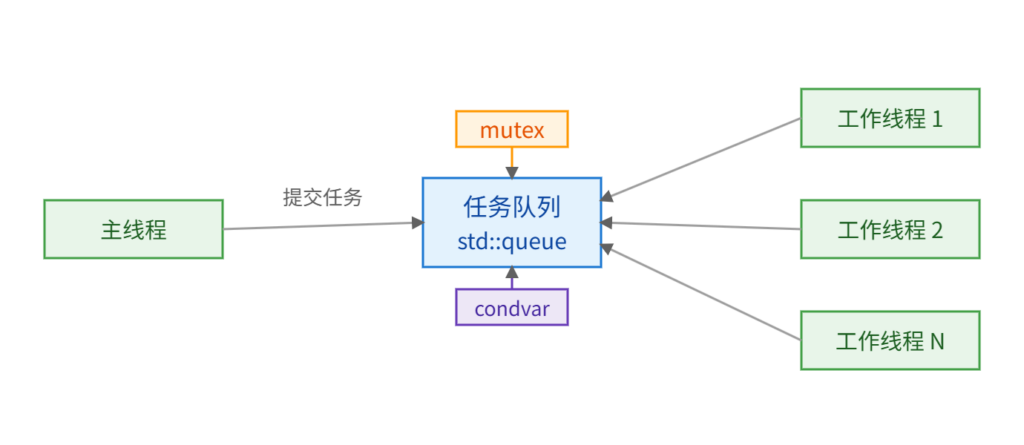
中间是一个std::queue<std::function<void()>>类型的任务队列,队列上方挂着一把std::mutex负责互斥访问,下方挂着一个std::condition_variable,用来让工作线程在队列为空时进入等待状态。左侧的主线程负责往队列里提交任务:拿锁、push任务、解锁,然后调用notify_one()提醒某个工作线程可以醒来干活。右侧则是由若干个工作线程,它们在一个循环里,先拿锁,如果队列为空且没有停止信号,就调用wait()在条件变量上睡觉,被唤醒后重新拿锁,从队列里取一个任务,把锁释放,然后再自己的栈上执行这个任务。这样一来,线程数量是固定的,任务数可以很多,而且不会忙等浪费CPU。
同样的在线程外,我们再定义一个stats结构体,用一把单独的mutex保护两个计数器,total_tasks记录提交的任务数,completed_tasks记录已经执行完成的任务数。每当主线程调用submit()提交任务时就调用一次on_task_submitted()加一,每个任务执行完后调用一次on_task_completed()加一,结束的还可以看到类似这样的[Stats] total=20 completed=17的统计信息。
三、源码与示例输出
整体结构已经说明了源码的设计内容,具体实现可以自己分析以下完整的
#include <iostream>
#include <thread>
#include <mutex>
#include <condition_variable>
#include <queue>
#include <vector>
#include <functional>
#include <chrono>
class ThreadPool {
public:
    explicit ThreadPool(std::size_t worker_count)
        : stop_(false) {
        if (worker_count == 0)
            worker_count = 1;
        for (std::size_t i = 0; i < worker_count; ++i) {
            workers_.emplace_back(&ThreadPool::worker_loop, this, i);
        }
    }

    // 禁止拷贝,简单起见
    ThreadPool(const ThreadPool&) = delete;
    ThreadPool& operator=(const ThreadPool&) = delete;

    // 提交一个任务
    void submit(std::function<void()> task) {
        {
            std::lock_guard<std::mutex> lock(queue_mutex_);
            if (stop_) {
                throw std::runtime_error("submit on stopped ThreadPool");
            }
            tasks_.push(std::move(task));
        }
        queue_cv_.notify_one();
    }

    // 通知线程池停止,等待所有线程退出
    void shutdown() {
        {
            std::lock_guard<std::mutex> lock(queue_mutex_);
            stop_ = true;
        }
        queue_cv_.notify_all();
        for (std::thread& t : workers_) {
            if (t.joinable()) {
                t.join();
            }
        }
        workers_.clear();
    }

    ~ThreadPool() {
        // 保证析构时已经停掉;如果用户忘了显式 shutdown,这里自动做一次
        shutdown_no_throw();
    }

private:
    void worker_loop(std::size_t index) {
        for (;;) {
            std::function<void()> task;
            {
                std::unique_lock<std::mutex> lock(queue_mutex_);
                // 没任务且没停,就等待;stop_ 为真或者有任务时被唤醒
                queue_cv_.wait(lock, [this] {
                    return stop_ || !tasks_.empty();
                    });

                if (stop_ && tasks_.empty()) {
                    // 没有剩余任务,且收到停止信号,退出线程
                    return;
                }

                task = std::move(tasks_.front());
                tasks_.pop();
            }
            // 在不持锁的情况下执行任务
            task();
        }
    }

    void shutdown_no_throw() {
        {
            std::lock_guard<std::mutex> lock(queue_mutex_);
            if (stop_)
                return;
            stop_ = true;
        }
        queue_cv_.notify_all();
        for (std::thread& t : workers_) {
            if (t.joinable()) {
                try {
                    t.join();
                }
                catch (...) {
                    // 析构阶段不要再抛异常
                }
            }
        }
        workers_.clear();
    }

    std::vector<std::thread> workers_;
    std::queue<std::function<void()>> tasks_;
    std::mutex queue_mutex_;
    std::condition_variable queue_cv_;
    bool stop_;
};

// 用来统计完成的任务数,演示 mutex 保护共享数据
struct Stats {
    std::mutex m;
    std::size_t total_tasks = 0;
    std::size_t completed_tasks = 0;

    void on_task_submitted() {
        std::lock_guard<std::mutex> lock(m);
        ++total_tasks;
    }

    void on_task_completed() {
        std::lock_guard<std::mutex> lock(m);
        ++completed_tasks;
    }

    void print() {
        std::lock_guard<std::mutex> lock(m);
        std::cout << "[Stats] total=" << total_tasks
            << " completed=" << completed_tasks << '\n';
    }
};

// 一个模拟耗时工作的任务:打印、sleep 一下、更新统计信息
std::function<void()> make_task(int id, Stats* stats) {
    return [id, stats] {
        {
            std::cout << "Task " << id
                << " is running on thread "
                << std::this_thread::get_id() << '\n';
        }
        std::this_thread::sleep_for(std::chrono::milliseconds(100 + (id % 5) * 50));
        if (stats) {
            stats->on_task_completed();
        }
        };
}

// 一个安全的线程池演示:创建线程池,提交任务,等待结束
void safe_thread_pool_demo() {
    Stats stats;
    const std::size_t worker_count =
        std::max(2u, std::thread::hardware_concurrency());

    std::cout << "Starting ThreadPool with "
        << worker_count << " worker threads\n";

    ThreadPool pool(worker_count);

    const int task_count = 20;
    for (int i = 0; i < task_count; ++i) {
        stats.on_task_submitted();
        pool.submit(make_task(i, &stats));
    }

    // 可以在任务执行过程中隔一会儿打印一下统计信息
    std::this_thread::sleep_for(std::chrono::milliseconds(500));
    stats.print();

    pool.shutdown();
    stats.print();
    std::cout << "ThreadPool demo finished.\n";
}

// 一个典型的死锁实验:故意用相反顺序加锁
void deadlock_demo() {
    std::mutex m1, m2;

    auto t1 = std::thread([&] {
        std::lock_guard<std::mutex> lock1(m1);
        std::cout << "t1 locked m1\n";
        std::this_thread::sleep_for(std::chrono::milliseconds(100));
        std::cout << "t1 trying to lock m2...\n";
        std::lock_guard<std::mutex> lock2(m2); // 这里可能卡死
        std::cout << "t1 locked m2\n";
        });

    auto t2 = std::thread([&] {
        std::lock_guard<std::mutex> lock2(m2);
        std::cout << "t2 locked m2\n";
        std::this_thread::sleep_for(std::chrono::milliseconds(100));
        std::cout << "t2 trying to lock m1...\n";
        std::lock_guard<std::mutex> lock1(m1); // 这里可能卡死
        std::cout << "t2 locked m1\n";
        });

    t1.join();
    t2.join();
}

int main() {
    std::cout << "=== Safe ThreadPool demo ===\n";
    safe_thread_pool_demo();

    std::cout << "\n=== Deadlock demo (optional) ===\n";
    std::cout << "当前默认不运行死锁实验,避免程序卡死。\n";
    std::cout << "如果想体验死锁,请在 main() 里调用 deadlock_demo()。\n";
    // deadlock_demo(); // 小心:取消注释后程序可能会卡住不退出

    return 0;
}
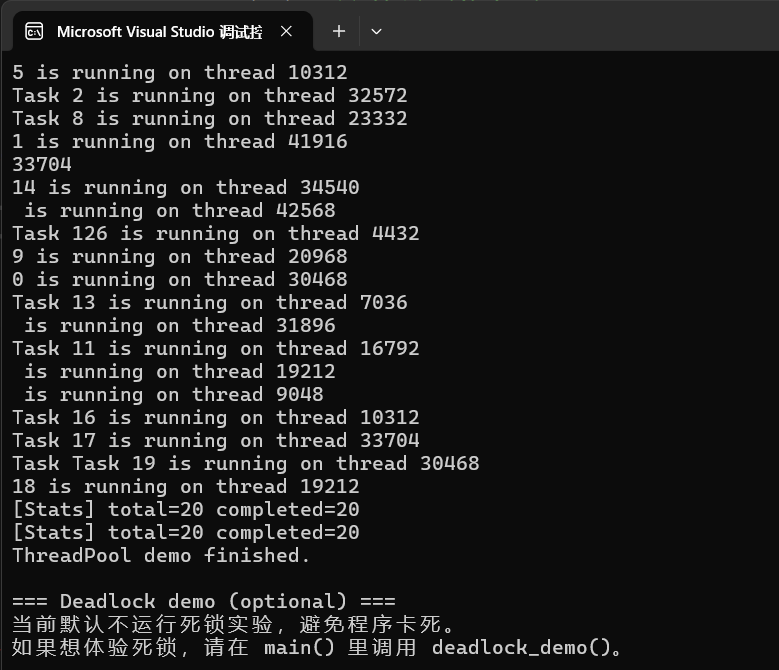
这是正常添加20个任务并成功执行的结果:
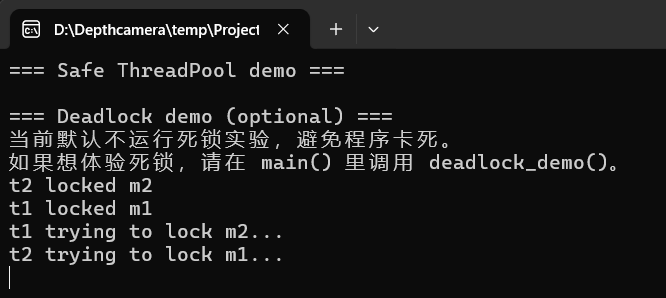
这是启动死锁示例的输出:程序会一直卡在这里