前言
本文转载https://linux.do/t/topic/261672这个帖子,并在该帖子的说明上上做出了相关的修改。
一开始我部署了一个newapi服务器,用于路由各种各样的ai请求,到了后面发现一开始使用的sqllite部署方案有诸多缺点,所以便想要将newapi的sqlite数据库迁移到部署的postgresql上面。本文使用的是宝塔一键安装的postgresql。
操作前准备
服务器上准备好node-js环境、安装好宝塔的postgresql数据库
操作步骤
首先我们要找到newapi的sqlite文件,这个文件名字叫做”one-api.db”。找到后复制到一个空的目录中。
在宝塔的数据库管理面板新建一个postgres数据库。
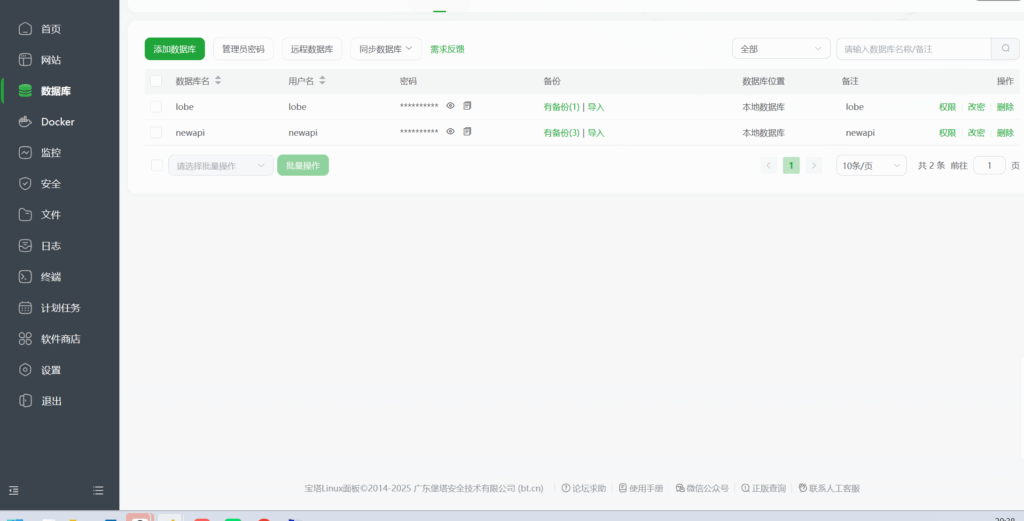
然后启动newapi(启动一个全新的newapi实例,不是以前的需要迁移的那个newapi,这个新的newapi中配置好刚刚新建的postgres数据库的地址)。注意新的newapi启动后不要进行首次使用的设置(我们只需要让newapi启动后自动建立一些空表,如果进行了首次使用设置 会造成导入的数据与新设置的数据冲突)。
启动一小段时间(10s左右),删除或者停止新创建的newapi。
然后回到刚刚放oneapi.db的目录,我们先创建一个文件,叫做 import.js ,代码如下
import sqlite3 from 'sqlite3';
import pg from 'pg';
import chalk from 'chalk';

const { Pool } = pg;

// 数据库连接配置
const sqliteDb = new sqlite3.Database('./one-api.db');
const pgPool = new Pool({
    connectionString: 'postgres://用户:密码@127.0.0.1:5432/数据库名称'
});

// 日志函数
const log = {
    info: (msg) => console.log(chalk.blue(`[INFO] ${msg}`)),
    success: (msg) => console.log(chalk.green(`[SUCCESS] ${msg}`)),
    error: (msg) => console.log(chalk.red(`[ERROR] ${msg}`)),
    warn: (msg) => console.log(chalk.yellow(`[WARN] ${msg}`))
};

// 获取SQLite表结构
async function getSqliteSchema(tableName) {
    return new Promise((resolve, reject) => {
        sqliteDb.all(`PRAGMA table_info(${tableName})`, (err, columns) => {
            if (err) reject(err);
            resolve(columns.map(col => ({
                name: col.name,
                type: col.type.toUpperCase(),
                nullable: !col.notnull,
                isPrimaryKey: col.pk === 1
            })));
        });
    });
}

// 获取PostgreSQL表结构
async function getPgSchema(tableName) {
    const query = `
        SELECT c.column_name, c.data_type, c.is_nullable,
               CASE WHEN pk.column_name IS NOT NULL THEN true ELSE false END as is_primary_key
        FROM information_schema.columns c
        LEFT JOIN (
            SELECT ku.column_name
            FROM information_schema.table_constraints tc
            JOIN information_schema.key_column_usage ku
                ON tc.constraint_name = ku.constraint_name
            WHERE tc.constraint_type = 'PRIMARY KEY'
                AND tc.table_name = $1
        ) pk ON c.column_name = pk.column_name
        WHERE c.table_name = $1
        ORDER BY c.ordinal_position;
    `;
    const { rows } = await pgPool.query(query, [tableName]);
    return rows.map(col => ({
        name: col.column_name,
        type: col.data_type.toUpperCase(),
        nullable: col.is_nullable === 'YES',
        isPrimaryKey: col.is_primary_key
    }));
}

// 获取所有表名
async function getTables() {
    return new Promise((resolve, reject) => {
        sqliteDb.all("SELECT name FROM sqlite_master WHERE type='table'", (err, tables) => {
            if (err) reject(err);
            resolve(tables.map(t => t.name));
        });
    });
}

// 数据类型转换映射
const typeConversions = {
    'INTEGER': 'integer',
    'REAL': 'double precision',
    'TEXT': 'text',
    'BLOB': 'bytea',
    'BOOLEAN': 'boolean',
    'NUMERIC': 'boolean',
    // 添加更多类型映射...
};

// 检查并比较表结构
async function compareSchemas(tableName) {
    log.info(`比较表 ${tableName} 的结构`);
    const sqliteSchema = await getSqliteSchema(tableName);
    const pgSchema = await getPgSchema(tableName);

    const differences = [];
    sqliteSchema.forEach(sqliteCol => {
        const pgCol = pgSchema.find(p => p.name === sqliteCol.name);
        if (!pgCol) {
            differences.push(`列 ${sqliteCol.name} 在PostgreSQL中不存在`);
            return;
        }

        if (sqliteCol.type !== pgCol.type) {
            differences.push(`列 ${sqliteCol.name} 类型不匹配: SQLite(${sqliteCol.type}) vs PG(${pgCol.type})`);
        }
        if (sqliteCol.nullable !== pgCol.nullable) {
            differences.push(`列 ${sqliteCol.name} nullable属性不匹配`);
        }
    });

    return differences;
}

// 转换数据
async function convertData(tableName, sqliteData, pgSchema) {
    return sqliteData.map(row => {
        const converted = {};
        for (const [key, value] of Object.entries(row)) {
            const pgColumn = pgSchema.find(col => col.name === key);
            if (!pgColumn) continue;

            if (value === null) {
                converted[key] = null;
                continue;
            }

            // 根据PostgreSQL的类型进行转换
            switch (pgColumn.type.toUpperCase()) {
                case 'BIGINT':
                    converted[key] = BigInt(value).toString();  // Convert to string to avoid BigInt serialization issues
                    break;
                case 'INTEGER':
                    converted[key] = parseInt(value);
                    break;
                case 'NUMERIC':
                    converted[key] = Number(value);
                    break;
                case 'BYTEA':
                    if (typeof value === 'number') {
                        // 如果原值是数字(比如0或1),作为布尔值处理
                        converted[key] = value === 1;
                    } else if (typeof value === 'string') {
                        converted[key] = value.toLowerCase() === 'true' || value === '1';
                    } else {
                        converted[key] = Boolean(value);
                    }
                    break;
                case 'BOOLEAN':
                    if (typeof value === 'number') {
                        converted[key] = value === 1;
                    } else if (typeof value === 'string') {
                        converted[key] = value.toLowerCase() === 'true' || value === '1';
                    } else {
                        converted[key] = Boolean(value);
                    }
                    break;
                case 'TIMESTAMP WITH TIME ZONE':
                    if (typeof value === 'number') {
                        // 如果是Unix时间戳(秒),转换为ISO字符串
                        converted[key] = new Date(value * 1000).toISOString();
                    } else {
                        // 如果已经是日期字符串,保持原样
                        converted[key] = value;
                    }
                    break;
                case 'CHARACTER':
                case 'CHARACTER VARYING':
                case 'TEXT':
                    converted[key] = String(value);
                    break;
                default:
                    converted[key] = value;
            }
        }
        return converted;
    });
}

// 迁移单个表的数据
async function migrateTable(tableName) {
    log.info(`开始迁移表 ${tableName}`);
    try {
        // 获取表结构
        const pgSchema = await getPgSchema(tableName);
        // 获取SQLite数据
        const sqliteData = await new Promise((resolve, reject) => {
            sqliteDb.all(`SELECT * FROM ${tableName}`, (err, rows) => {
                if (err) reject(err);
                resolve(rows);
            });
        });
        log.info(`读取到 ${sqliteData.length} 条记录`);
        // 转换数据
        const convertedData = await convertData(tableName, sqliteData, pgSchema);
        // 清空PostgreSQL表
        await pgPool.query(`TRUNCATE TABLE ${tableName} CASCADE`);
        log.info(`清空表 ${tableName}`);
        // 批量插入数据
        if (convertedData.length > 0) {
            const batchSize = 100; // 每批处理100条记录
            const columns = Object.keys(convertedData[0]);
            const quotedColumns = columns.map(col => `"${col}"`);
            let processedCount = 0;

            // 分批处理
            for (let i = 0; i < convertedData.length; i += batchSize) {
                const batch = convertedData.slice(i, i + batchSize);

                const valuesList = batch.map((row, rowIndex) => {
                    return `(${quotedColumns.map((col, colIndex) =>
                        `$${rowIndex * columns.length + colIndex + 1}`).join(', ')})`;
                }).join(',\n');

                const query = `
                    INSERT INTO ${tableName} (${quotedColumns.join(', ')})
                    VALUES ${valuesList}
                `;

                const params = [];
                for (const row of batch) {
                    for (const col of columns) {
                        params.push(row[col]);
                    }
                }

                await pgPool.query(query, params);
                processedCount += batch.length;
                log.info(`已迁移 ${processedCount}/${convertedData.length} 条记录...`);
            }

            log.success(`成功迁移 ${convertedData.length} 条记录到表 ${tableName}`);

            // 更新序列值(如果存在id列)
            if (columns.includes('id')) {
                try {
                    const result = await pgPool.query(`
                        SELECT MAX(id) as max_id FROM "${tableName}"
                    `);
                    const maxId = result.rows[0].max_id;
                    if (maxId) {
                        await pgPool.query(`
                            SELECT setval(pg_get_serial_sequence('${tableName}', 'id'), ${maxId})
                        `);
                        log.info(`已更新表 ${tableName} 的 id 序列值到 ${maxId}`);
                    }
                } catch (seqError) {
                    log.warn(`无法更新表 ${tableName} 的序列值: ${seqError.message}`);
                }
            }
        }
    } catch (error) {
        log.error(`迁移表 ${tableName} 时发生错误: ${error.message}`);
        throw error;
    }
}

// 主迁移函数
async function migrate() {
    try {
        log.info('开始数据库迁移');

        // 获取所有表
        const tables = await getTables();
        log.info(`发现 ${tables.length} 个表需要迁移`);

        // 比较所有表的结构
        for (const table of tables) {
            const differences = await compareSchemas(table);
            if (differences.length > 0) {
                log.warn(`表 ${table} 结构差异:`);
                differences.forEach(diff => log.warn(`- ${diff}`));
            } else {
                log.success(`表 ${table} 结构匹配`);
            }
        }

        // 执行迁移
        for (const table of tables) {
            await migrateTable(table);
        }

        log.success('数据库迁移完成');

    } catch (error) {
        log.error(`迁移过程中发生错误: ${error.message}`);
        throw error;
    } finally {
        // 关闭连接
        await pgPool.end();
        sqliteDb.close();
    }
}

// 运行迁移
migrate().catch(console.error);
保存之后(别忘记将代码中相关的账号密码数据库信息调整为刚刚我们新建的数据库),然后在当前目录执行下述命令
echo '{"type": "module"}' > package.jsonnpm install sqlite3 pg chalk
然后直接执行 node import.js
完成后重启newapi容器,数据导入完成。
一些其他的后话
转化完后便可以卸载node-js了(如果需要给服务器腾出空间出来)。
当数据量较大的时候,转化可能是需要一些时间的。